What Is Scale on a Site Plan? A Plain-English Guide
Scale is one of the most misunderstood concepts on a site plan, yet getting it right is essential for permit approval. This plain-English guide breaks down exactly what site plan scale means, how to read it, and which scale your local permit office is likely to require.
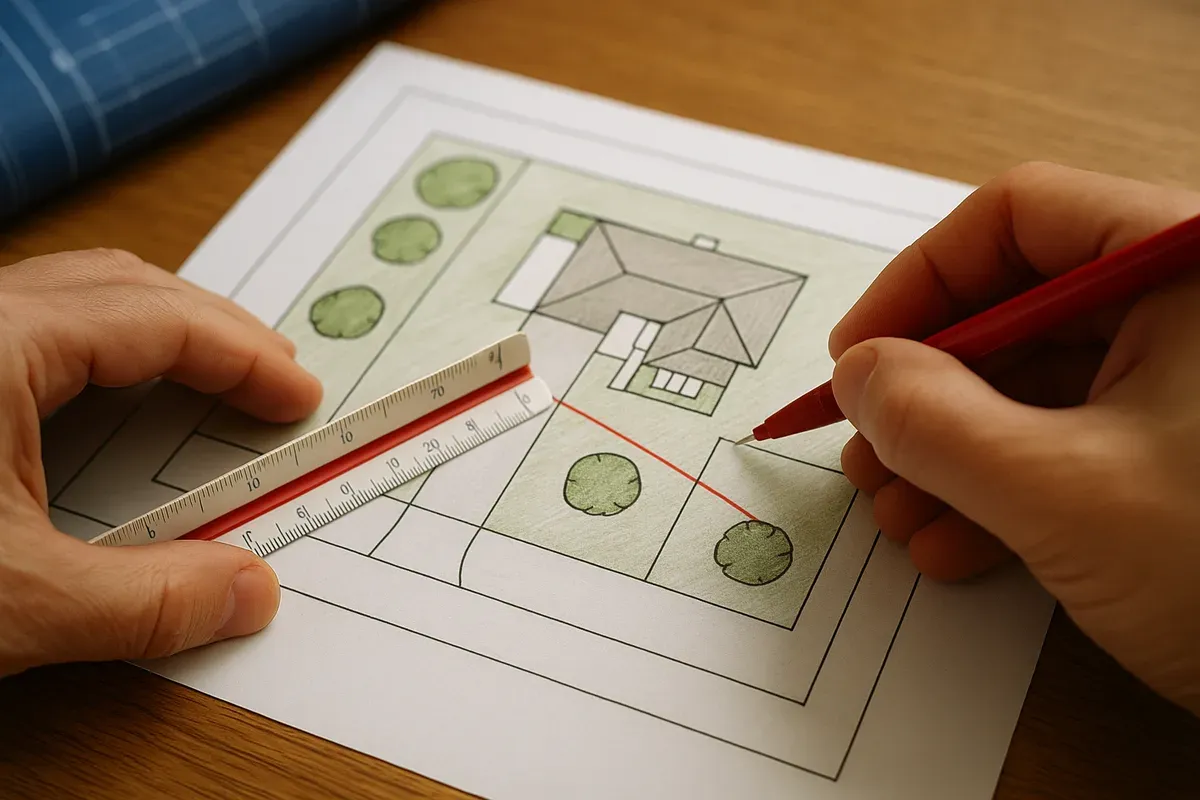
<p>If you've ever stared at a site plan and wondered why a house that's 40 feet wide fits neatly on an 8.5-by-11-inch sheet of paper, the answer is scale. Scale is the invisible rulebook that lets architects, engineers, and permit reviewers shrink an entire property down to a manageable drawing without losing any of the critical measurements that make the plan legally useful.</p>
<p>For <a href="/homeowners">homeowners</a> applying for a <a href="/construction-permit-site-plans">building permit</a>, understanding site plan scale isn't just an academic exercise. Submit a drawing at the wrong scale, or forget to label the scale entirely, and your permit application can be rejected before a reviewer even looks at where your addition sits relative to the property line. This guide explains everything you need to know in plain English, from what scale actually means to which ratio your local permit office is most likely to require in 2026.</p>
<h2>What Does Scale Mean on a Site Plan?</h2>
<p>In everyday life, "scale" often just means size. On a site plan, it means something far more precise: <strong>the fixed ratio between a measurement on the drawing and the corresponding real-world measurement on the ground.</strong></p>
<p>Think of it like a map legend. When a road map says "1 inch = 50 miles," every inch you measure on the paper represents 50 actual miles of road. Site plans work exactly the same way, just at a much smaller distance. Instead of miles, you're dealing with feet, and instead of a road map, you're looking at a bird's-eye view of your property showing your house, driveway, setbacks, and property boundaries.</p>
<p>Without a stated scale, a site plan is essentially useless to a permit reviewer. They have no way of knowing whether the gap between your proposed garage and your side property line is 3 feet or 30 feet. Scale is what transforms a pretty sketch into a legally measurable document.</p>
<h3>The Two Ways Scale Is Expressed</h3>
<p>You'll encounter site plan scale written in two common formats:</p>
<ol>
<li><p><strong>Ratio format</strong> (also called representative fraction): Written as 1:240 or 1/240, this means one unit on the drawing equals 240 of the same units in real life. If you're measuring in inches, 1 inch on paper equals 240 inches (or 20 feet) on the ground.</p>
</li>
<li><p><strong>Verbal or engineer's scale format</strong>: Written as "1 inch = 20 feet" or "1" = 20'." This is the format most homeowners find easiest to read and the one most commonly required by U.S. permit offices.</p>
</li>
</ol>
<p>Both formats communicate the same information. In the United States, the verbal format dominates residential site plans, so that's what you'll see on most permit applications.</p>
<h2>Common Site Plan Scales and When They're Used</h2>
<p>Not every property uses the same scale. The right scale depends on the size of your lot, the level of detail required, and the paper size you're printing on. Here's a breakdown of the scales you're most likely to encounter:</p>
<h3>1 inch = 10 feet (1:120)</h3>
<p>This is a large-scale drawing, meaning objects appear relatively big on paper. It works well for small urban or suburban lots where you need to show fine details like the exact placement of a deck, a fence, or utility connections. The tradeoff is that a large property won't fit on a standard sheet at this scale without tiling across multiple pages.</p>
<h3>1 inch = 20 feet (1:240)</h3>
<p>This is arguably the most popular scale for residential site plans in the United States. At 1 inch = 20 feet, a standard 8.5-by-11-inch sheet can comfortably display a lot up to roughly 170 feet wide and 220 feet deep, which covers the vast majority of suburban residential properties. Permit offices in most jurisdictions accept or specifically request this scale, and it provides enough room to clearly label setbacks, building footprints, driveways, and utility easements without the drawing feeling cramped.</p>
<p>If you've ever been told to submit a site plan at "1 to 240," this is the scale they mean.</p>
<h3>1 inch = 30 feet (1:360)</h3>
<p>A step up in coverage, this scale is useful for slightly larger lots or when you need to show the entire property plus surrounding context (neighboring structures, street right-of-way, etc.) on a single sheet. Some rural counties and municipalities with larger average lot sizes prefer this scale for residential applications.</p>
<h3>1 inch = 40 feet (1:480)</h3>
<p>You'll see this scale used for larger residential parcels, light commercial properties, or situations where the permit office wants to see the full site context on one sheet. At this scale, fine details can start to get crowded, so it's typically reserved for properties where the overall layout matters more than precise small-scale measurements.</p>
<h3>1 inch = 50 feet and Beyond</h3>
<p>These smaller scales are generally reserved for commercial, industrial, or large rural properties. For a typical homeowner adding a deck, an <a href="/adu-feasibility-software">accessory dwelling unit</a> (ADU), or a detached garage, you're unlikely to need anything smaller than 1 inch = 40 feet.</p>
<h2>Why Scale Matters for Permit Approval</h2>
<p>Permit reviewers are not just looking at whether your project looks reasonable. They are legally required to verify that your proposed construction meets the dimensional requirements of your local zoning code. That means they need to be able to physically measure your site plan with a scale ruler and confirm:</p>
<ul>
<li>The distance from your proposed structure to each property line (setbacks)</li>
<li>The total footprint of all structures relative to your lot size (lot coverage)</li>
<li>The distance from your structure to any easements, flood zones, or utility corridors</li>
<li>The width of driveways, parking areas, and access paths</li>
</ul>
<p>If your drawing is not at a stated, consistent scale, none of those measurements can be verified. The reviewer has no choice but to send your application back.</p>
<p>According to the <a href="https://www.iccsafe.org" rel="nofollow noopener" target="_blank">International Building Code resources at ICC Safe</a>, site plans submitted for permit review must be drawn to a recognizable scale and must include a scale bar or written scale notation. Many local jurisdictions adopt these standards directly into their permit application requirements.</p>
<h3>What Happens When Scale Is Wrong or Missing</h3>
<p>Here are the most common scale-related reasons permit applications get rejected:</p>
<ol>
<li><strong>No scale listed</strong>: The drawing looks fine visually, but there's no notation telling the reviewer what scale was used.</li>
<li><strong>Inconsistent scale</strong>: Different parts of the drawing were drawn at different scales, making measurements unreliable.</li>
<li><strong>Wrong scale for the paper size</strong>: A 1 inch = 10 feet drawing printed on a standard letter sheet might cut off half the property.</li>
<li><strong>Scale stated but not accurate</strong>: The drawing was resized during printing, so the stated scale no longer matches the actual printed dimensions.</li>
<li><strong>No scale bar included</strong>: A graphic scale bar is important because it remains accurate even if the document is printed at a different size.</li>
</ol>
<p>The fix for most of these problems is straightforward: always include both a written scale notation ("1" = 20'") and a graphic scale bar on your site plan. The graphic bar is especially important for digital submissions, where the file may be printed at various sizes.</p>
<h2>How to Read a Site Plan Scale</h2>
<p>Reading a site plan scale is easier than it sounds once you understand the math. Here's a simple step-by-step process:</p>
<h3>Step 1: Find the Scale Notation</h3>
<p>Look in the title block, usually in the lower right corner of the drawing. You should see something like "Scale: 1" = 20'" or "Scale: 1:240."</p>
<h3>Step 2: Use a Scale Ruler (or Do the Math)</h3>
<p>A standard engineer's scale ruler has multiple scales printed on it, including 1:10, 1:20, 1:30, 1:40, 1:50, and 1:60. For a drawing at 1 inch = 20 feet, you'd use the 1:20 face of the ruler, where each graduation represents 1 foot at that scale.</p>
<p>If you don't have a scale ruler, you can use a regular ruler and multiply. At 1 inch = 20 feet:</p>
<ul>
<li>0.5 inches on paper = 10 feet in real life</li>
<li>1.5 inches on paper = 30 feet in real life</li>
<li>2.25 inches on paper = 45 feet in real life</li>
</ul>
<p>Just measure the distance in inches and multiply by 20.</p>
<h3>Step 3: Use the Graphic Scale Bar as a Backup</h3>
<p>A graphic scale bar looks like a small ruler printed directly on the drawing. Even if the document gets resized during printing, you can hold a real ruler up to the graphic bar, figure out the current ratio, and use that to take accurate measurements. This is why including a graphic scale bar is considered best practice on any professional site plan.</p>
<h2>Choosing the Right Scale for Your Site Plan</h2>
<p>If you're creating a site plan for a permit application, here's a practical framework for choosing the right scale:</p>
<h3>Check Your Permit Office Requirements First</h3>
<p>Before you draw anything, visit your local building department's website or call their office and ask specifically what scale they require for residential site plans. Many jurisdictions publish their requirements online. The <a href="https://www.planning.org" rel="nofollow noopener" target="_blank">American Planning Association</a> notes that zoning and permit requirements vary significantly by municipality, so there's no universal standard you can safely assume applies everywhere.</p>
<p>Some offices are flexible and will accept any clearly labeled scale. Others specify exactly what they want, often 1 inch = 20 feet for lots under a certain size.</p>
<h3>Match the Scale to Your Lot Size and Paper Size</h3>
<p>Use this general guide for standard 8.5-by-11-inch or 11-by-17-inch submissions:</p>
<ul>
<li>Lots up to 100 x 150 feet: 1 inch = 20 feet works well on letter-size paper</li>
<li>Lots up to 150 x 200 feet: Consider 1 inch = 30 feet on letter-size, or 1 inch = 20 feet on tabloid (11x17)</li>
<li>Lots over 200 feet in any dimension: 1 inch = 40 feet or larger, or use a larger paper format</li>
</ul>
<h3>Prioritize Legibility</h3>
<p>A scale that makes your drawing so small that labels overlap and dimensions are unreadable defeats the purpose. If you find yourself squinting to read setback labels, go to a smaller ratio (larger scale) or use a larger paper size. Permit reviewers need to read your drawing quickly and accurately.</p>
<h2>Scale on Digital Site Plans vs. Printed Plans</h2>
<p>One of the most common mistakes homeowners make in 2026 is assuming that a digital site plan file is automatically "to scale" when printed. It isn't, unless you take specific steps to ensure it.</p>
<h3>The Printing Problem</h3>
<p>When you print a PDF or image file, most printers default to "fit to page" or "scale to fit" settings. This means the software resizes your drawing to fill the paper, which destroys the stated scale. A drawing labeled "1" = 20'" that gets scaled to 87% during printing is no longer at 1 inch = 20 feet. Anyone trying to measure it with a scale ruler will get incorrect results.</p>
<p>To avoid this:</p>
<ol>
<li>Always print at 100% or "actual size," never "fit to page."</li>
<li>After printing, verify the graphic scale bar with a physical ruler to confirm it printed correctly.</li>
<li>If submitting digitally, export at a resolution that preserves the scale relationship, and include a note in your submission about the intended print size.</li>
</ol>
<h3>Browser-Based CAD Tools and Scale</h3>
<p>Modern browser-based site plan tools handle scale automatically by letting you input real-world dimensions and then rendering the drawing at a selected scale. This is a major advantage over drawing by hand or using general-purpose graphics software, where maintaining a consistent scale requires constant manual calculation. When you use a purpose-built tool, the scale notation and graphic bar are generated automatically and remain accurate as long as you print at 100%.</p>
<h2>Scale and Setbacks: Why the Connection Matters</h2>
<p>Setbacks are the minimum distances your local zoning code requires between a structure and a property line, easement, or other feature. They are measured in feet on the ground, but they appear as fractions of an inch on your site plan.</p>
<p>At 1 inch = 20 feet, a 5-foot side setback appears as just 0.25 inches on paper. That's a quarter of an inch. If your drawing is even slightly off scale, that tiny gap could look like it's either compliant or non-compliant when the reality is the opposite.</p>
<p>This is why permit reviewers take scale so seriously. A drawing that's off by even a small percentage can make a non-compliant setback appear legal. Conversely, a project that actually meets <a href="/setback-guide">setback requirements</a> might get flagged for review if the drawing makes it look too close to the line.</p>
<p>For properties in FEMA-designated flood zones, accurate scale becomes even more critical. Reviewers need to confirm that structures are positioned correctly relative to flood zone boundaries, which are drawn on <a href="https://msc.fema.gov/portal/home" rel="nofollow noopener" target="_blank">FEMA's Flood Map Service Center</a> maps at specific scales. Any discrepancy between your site plan scale and the flood map scale can create costly delays.</p>
<h2>Tips for Getting Scale Right the First Time</h2>
<p>Here are practical tips to help you nail the scale on your site plan and avoid a rejection:</p>
<ul>
<li><strong>Start with your property survey</strong>: Your legal survey already has real-world dimensions. Use those as your source of truth for all measurements before you decide on a scale.</li>
<li><strong>Choose your paper size first, then your scale</strong>: Don't draw at a scale and then try to figure out what paper size it needs. Start with the paper size your permit office accepts, then calculate which scale fits your property.</li>
<li><strong>Always include both a written scale and a graphic bar</strong>: The written scale tells reviewers the intended ratio. The graphic bar lets them verify it even if the document was resized.</li>
<li><strong>Label all key dimensions</strong>: Don't make reviewers measure everything themselves. Label the distances from structures to property lines directly on the drawing.</li>
<li><strong>Do a test print before finalizing</strong>: Print a draft, measure the graphic scale bar with a ruler, and confirm it matches the stated scale before you submit.</li>
<li><strong>Keep the original file</strong>: If a reviewer asks you to reprint at a different scale or paper size, having the original editable file makes that change quick and painless.</li>
</ul>
<h2>How <a href="/">Site Plan Creator</a> Handles Scale</h2>
<p>Site Plan Creator is built around the reality that most homeowners are not drafters or engineers. The application lets you input your property dimensions in real-world feet and automatically handles the conversion to the correct drawing scale. You choose your target scale (such as 1 inch = 20 feet) from a dropdown, and the tool renders your property, structures, setbacks, and labels at that scale automatically.</p>
<p>When you export your finished plan, the PDF includes both the written scale notation and a graphic scale bar, formatted to print correctly at 100% on standard paper sizes. This eliminates the most common source of scale errors on homeowner-prepared site plans: the gap between what the drawing is supposed to show and what actually ends up on the printed page.</p>
<p>The result is a permit-ready site plan that meets the dimensional documentation standards permit offices expect, without requiring you to understand drafting conventions or engineer's scale rulers.</p>
<h2>Conclusion</h2>
<p>Scale is not a technicality you can safely ignore on a site plan. It is the foundation that makes the entire document legally useful. Without a correct, clearly labeled scale, a permit reviewer cannot verify your setbacks, your lot coverage, or your compliance with zoning requirements. That means delays, resubmissions, and frustration that could have been avoided.</p>
<p>The good news is that once you understand what scale means (a fixed ratio between paper measurements and real-world distances), the rest falls into place. Choose the right scale for your lot size and paper format, include both a written notation and a graphic bar, and always verify your print settings before submitting.</p>
<p>If you want to skip the manual math entirely, Site Plan Creator does the heavy lifting for you. Visit <a href="https://www.siteplancreator.com">siteplancreator.com</a> to create a professionally scaled, permit-ready site plan in a fraction of the time it would take to draft one by hand. Your permit reviewer will thank you.</p>