How to Find Your Property's Legal Description Explained
Your property's legal description is more than an address — it's the official language that defines exactly where your land begins and ends. This guide explains how to find it, what it means, and why it matters for permits, site plans, and property transactions.
<h2>What Is a Property Legal Description — and Why Does It Matter?</h2>
<p>Your street address tells delivery drivers where to find you. Your property's <strong>legal description</strong> tells the entire legal and planning system exactly what land you own — down to the inch. These are two very different things, and confusing them can create serious problems when you're pulling permits, filing surveys, or drawing up a site plan.</p>
<p>A legal description is the formal, standardized language used in deeds, titles, mortgages, and government records to uniquely identify a parcel of land. Unlike an address, which can change when a city renumbers streets or a county reorganizes postal zones, a legal description is permanent. It anchors your property to the physical earth using a system of measurements, reference points, and recorded plat maps that have been legally recognized for decades — sometimes centuries.</p>
<p>If you've ever tried to apply for a <a href="/construction-permit-site-plans">building permit</a>, submit a site plan for review, or refinance your home, you've probably encountered a legal description and wondered what on earth it means. Phrases like "commencing at the iron pin set at the northeast corner of Lot 14" or "S 47° 30' E, 125.00 feet" can look like a foreign language. But once you understand the underlying systems, they become readable — and genuinely useful.</p>
<p>This guide will walk you through exactly how to find your property's legal description, explain the three major systems used across the United States, and show you how to use that information when preparing permit applications and property site plans.</p>
<hr>
<h2>The Three Major Legal Description Systems in the U.S.</h2>
<p>Before you can decode your legal description, you need to understand which system was used to create it. The United States uses three primary methods, and which one applies to your property depends largely on where you live and when your land was originally surveyed.</p>
<h3>1. Metes and Bounds</h3>
<p>Metes and bounds is the oldest land description system used in the United States, dating back to the original thirteen colonies and still dominant throughout the eastern states, Texas, and parts of the South. It describes land by tracing the boundary lines of a parcel using a combination of directions (bearings) and distances, starting from a defined point of beginning (POB).</p>
<p>Here's a simplified example of what a metes and bounds description looks like:</p>
<blockquote>
<p><em>Beginning at an iron pin set at the intersection of the northerly right-of-way line of Maple Street and the easterly right-of-way line of Oak Avenue; thence N 00° 15' 30" E, 150.00 feet; thence S 89° 44' 30" E, 75.00 feet; thence S 00° 15' 30" W, 150.00 feet; thence N 89° 44' 30" W, 75.00 feet to the Point of Beginning.</em></p>
</blockquote>
<p>Breaking that down:</p>
<ul>
<li><strong>Bearings</strong> like "N 00° 15' 30" E" describe compass directions. The letters indicate which quadrant (North/South, then East/West), and the degrees/minutes/seconds indicate the angle.</li>
<li><strong>Distances</strong> are typically in feet, though older descriptions may use chains, rods, or links — archaic surveying units.</li>
<li><strong>Monuments</strong> are physical markers — iron pins, concrete monuments, natural features — that anchor the description to the ground.</li>
<li>The description always closes back on itself, ending at the Point of Beginning.</li>
</ul>
<p>Metes and bounds descriptions can be extremely precise or frustratingly vague, depending on their age. Older descriptions may reference monuments like "a large oak tree" or "the corner of the old stone wall" — landmarks that may no longer exist. This is one reason why professional surveys are sometimes necessary to confirm boundaries.</p>
<h3>2. Lot and Block (Recorded Plat System)</h3>
<p>The lot and block system — also called the recorded plat system — is the most common method used for residential subdivisions across the country. When a developer subdivides a larger parcel into individual lots, they create a <strong>plat map</strong> that is officially recorded with the county. Each lot is assigned a number within a named block, and each block sits within a named subdivision.</p>
<p>A typical lot and block legal description looks like this:</p>
<blockquote>
<p><em>Lot 14, Block 3, Sunset Ridge Subdivision, Phase II, as recorded in Plat Book 42, Page 17, of the public records of Hillsborough County, Florida.</em></p>
</blockquote>
<p>This is far easier to read than metes and bounds, but it's not self-contained — you need to actually look up Plat Book 42, Page 17 to see the dimensions, setbacks, easements, and exact boundaries of Lot 14. The plat map is the source document, and it contains all the geometric and legal detail.</p>
<p>Lot and block descriptions are common in:</p>
<ul>
<li>Suburban and urban residential neighborhoods</li>
<li>Planned developments and HOA communities</li>
<li>Most properties developed after the mid-20th century in the western and midwestern United States</li>
</ul>
<h3>3. Public Land Survey System (PLSS)</h3>
<p>The <strong>Public Land Survey System</strong> (also called the rectangular survey system or township-range system) was established by the Land Ordinance of 1785 to survey the vast territories of the new United States. It divides land into a grid of townships, ranges, and sections, and is used predominantly in 30 states west of the original colonies.</p>
<p>A PLSS description looks like this:</p>
<blockquote>
<p><em>The Southwest Quarter of the Northeast Quarter (SW¼ NE¼) of Section 14, Township 2 North, Range 5 East, of the Boise Meridian, Ada County, Idaho.</em></p>
</blockquote>
<p>Here's how to decode it:</p>
<ul>
<li><strong>Meridians</strong> are the principal north-south reference lines. There are 37 principal meridians across the U.S.</li>
<li><strong>Ranges</strong> measure east-west distance from a meridian in 6-mile increments.</li>
<li><strong>Townships</strong> measure north-south distance from a baseline in 6-mile increments.</li>
<li><strong>Sections</strong> divide each 36-square-mile township into 36 one-square-mile sections (640 acres each).</li>
<li><strong>Aliquot parts</strong> like "SW¼ NE¼" subdivide sections into smaller parcels — in this case, a 40-acre parcel.</li>
</ul>
<p>For agricultural land, rural properties, and large parcels in the western U.S., PLSS descriptions are standard. For permit purposes, PLSS descriptions are often supplemented by a recorded plat or survey that provides more precise boundary data.</p>
<hr>
<h2>How to Find Your Property's Legal Description</h2>
<p>Now that you know what you're looking for, here's how to actually locate your property's legal description. There are several reliable sources, and in most cases, you can find this information for free.</p>
<h3>Check Your Deed</h3>
<p>The most authoritative source of your legal description is your <strong>deed</strong> — the document that transferred ownership of the property to you. Every deed must contain a legal description of the property being conveyed. If you purchased your home, your closing attorney or title company gave you a copy of the deed. Check the body of the document, usually after the grantor and grantee information, for language that begins with "described as follows" or "more particularly described as."</p>
<p>If you can't locate your deed physically, you can almost certainly find a digital copy through your county's official records system (more on that below).</p>
<h3>Search Your County Recorder or Clerk's Office</h3>
<p>Every deed, plat map, and property instrument in the United States is recorded with a county-level government office — typically called the County Recorder, Register of Deeds, Clerk of Courts, or County Assessor, depending on your state. Most of these offices now maintain searchable online databases.</p>
<p>To find your county's records portal:</p>
<ol>
<li>Search for "[Your County] property records" or "[Your County] deed search"</li>
<li>Look for the official .gov domain for your county</li>
<li>Search by owner name, parcel number, or property address</li>
<li>Locate the most recent deed and download or print it</li>
</ol>
<p>Many counties also offer <strong>GIS parcel viewers</strong> — interactive maps where you can click on a parcel and instantly see the legal description, ownership information, and parcel dimensions. These are invaluable tools for quick research.</p>
<h3>Use Your Property Tax Records</h3>
<p>Your county assessor's office maintains property tax records that typically include the legal description. You can often find these records online by searching "[Your County] property appraiser" or "[Your County] tax assessor." Search by your address or parcel identification number (PIN), and the property record card will usually display the legal description.</p>
<p>Note that the description in tax records is sometimes abbreviated for administrative convenience. Always verify against the actual deed when precision matters.</p>
<h3>Review Your Title Insurance Policy</h3>
<p>If you have a title insurance policy from your home purchase, the Schedule A section contains the complete legal description of the insured property. This is an excellent source because title companies verify the description carefully before issuing a policy.</p>
<h3>Contact a Title Company or Real Estate Attorney</h3>
<p>If you're struggling to locate your legal description, or if you need a certified copy for a legal transaction, a local title company or <a href="/real-estate">real estate</a> attorney can pull the records for you quickly. This is particularly useful for properties with complex ownership histories or older descriptions that require interpretation.</p>
<h3>Use the USGS or BLM Land Records for Rural Properties</h3>
<p>For properties described under the PLSS, the <a href="https://glorecords.blm.gov/" rel="nofollow noopener" target="_blank">Bureau of Land Management's General Land Office Records</a> website provides access to original federal land survey records, patents, and field notes. This is an exceptional resource for tracing rural property histories back to the original federal land grants.</p>
<hr>
<h2>Reading Your Legal Description for Permit and Site Plan Purposes</h2>
<p>Finding your legal description is only half the battle. Understanding how to use it — especially when preparing a site plan for a building permit — is where the real value lies.</p>
<h3>Identifying Your Parcel Boundaries</h3>
<p>When you're creating a site plan, the legal description is the foundation. It defines the outer edges of your property, from which all other measurements — building setbacks, easements, impervious surface coverage — are calculated. If your description is a lot and block reference, you'll need to pull the recorded plat to get the actual dimensions.</p>
<p>For metes and bounds properties, the bearings and distances in the description directly correspond to your boundary lines. A licensed surveyor can stake these boundaries physically, which is often required before a permit is issued for new construction.</p>
<h3>Locating Easements and Restrictions</h3>
<p>Legal descriptions and their associated recorded documents often reference easements — legal rights that allow utilities, neighbors, or the public to use portions of your property. Common types include:</p>
<ul>
<li><strong>Utility easements</strong> — for power lines, water mains, sewer lines</li>
<li><strong>Access easements</strong> — for shared driveways or ingress/egress</li>
<li><strong>Drainage easements</strong> — for stormwater management</li>
<li><strong>Conservation easements</strong> — restricting development in sensitive areas</li>
</ul>
<p>Easements must be shown on your site plan and will affect where you can place structures. Your deed and the plat map are the primary sources for identifying these restrictions.</p>
<h3>Understanding Setback Requirements</h3>
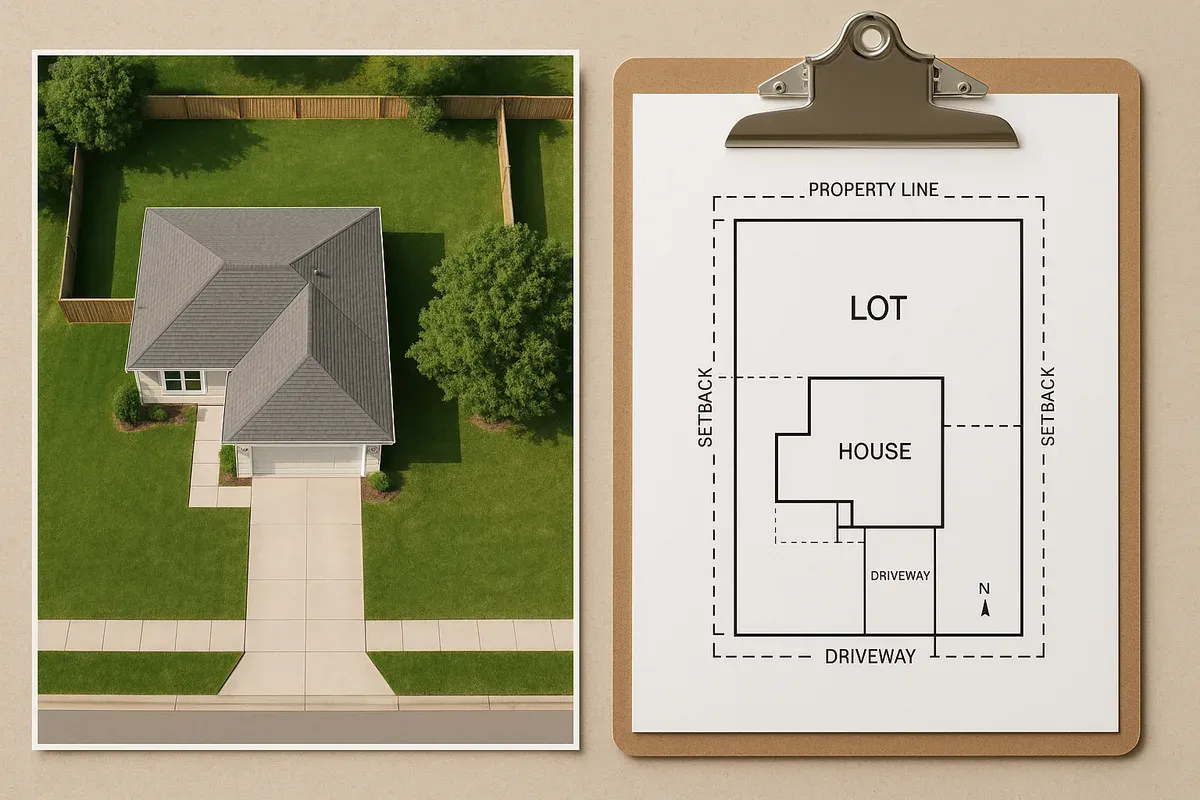
<p>Setbacks — the minimum distances structures must be placed from property lines — are established by your local zoning ordinance, not your legal description. However, you can't calculate setbacks without first knowing exactly where your property lines are, which is what the legal description provides.</p>
<p>For example, if your zoning district requires a 25-foot front yard setback and your lot is described as having a 150-foot depth, your buildable area starts 25 feet from the front property line and potentially ends 20 feet from the rear line — leaving you with 105 feet of buildable depth. These calculations form the backbone of any accurate site plan.</p>
<p>The <a href="https://www.planning.org/" rel="nofollow noopener" target="_blank">American Planning Association</a> maintains excellent resources on zoning and setback regulations that can help you understand how these rules apply to your property.</p>
<h3>Matching Your Description to Survey and GIS Data</h3>
<p>Modern GIS parcel data is derived from recorded plats and surveys, which are in turn based on legal descriptions. When you're using an online tool to create a site plan, the parcel boundaries shown on a map layer should align with your legal description — though minor discrepancies can exist due to datum differences, digitization errors, or unrecorded boundary adjustments.</p>
<p>Always cross-reference your site plan measurements against the legal description and, when precision is critical, against a current survey. Permit reviewers will flag discrepancies between submitted site plans and recorded property data.</p>
<hr>
<h2>Common Problems with Legal Descriptions (And How to Handle Them)</h2>
<p>Legal descriptions are not always clean and straightforward. Here are the most common issues property owners encounter and how to navigate them.</p>
<h3>Gaps and Overlaps</h3>
<p>In metes and bounds surveys, a description that doesn't mathematically close — meaning the endpoint doesn't return precisely to the point of beginning — indicates a gap or overlap with an adjacent parcel. This is a surveying error that must be corrected through a new survey and, potentially, a boundary line agreement with your neighbor.</p>
<h3>Outdated Monuments</h3>
<p>Older descriptions may reference physical monuments that no longer exist: trees that were cut down, fences that were removed, or buildings that were demolished. When the monument is gone, the boundary becomes legally ambiguous. A licensed surveyor can use the angular and distance data in the description to re-establish the boundary, but this can require court action in contested cases.</p>
<h3>Abbreviated or Informal Descriptions</h3>
<p>Some older deeds — particularly in rural areas or for properties transferred within families — contain informal descriptions like "the north half of the Smith farm" or "all that parcel known as the Johnson homestead." These descriptions are legally problematic and may need to be formalized through a survey and a corrective deed before you can obtain permits or financing.</p>
<h3>Conflicting Descriptions</h3>
<p>If a property has been conveyed multiple times with slightly different descriptions, or if a subdivision plat was amended after initial recording, you may find conflicting descriptions in the chain of title. A title attorney can research the chain and determine which description controls.</p>
<h3>When to Hire a Licensed Land Surveyor</h3>
<p>For any of the above situations — and any time you're planning significant construction, placing a fence, or resolving a boundary dispute — hiring a licensed professional land surveyor is the right call. Surveyors can:</p>
<ul>
<li>Physically locate and stake boundary corners</li>
<li>Prepare a boundary survey plat showing dimensions and improvements</li>
<li>Identify encroachments, easements, and setback violations</li>
<li>Prepare legal descriptions for new parcels or boundary adjustments</li>
</ul>
<p>In many jurisdictions, a current survey is required as part of the permit application package for new construction or major additions.</p>
<hr>
<h2>How Legal Descriptions Connect to Your Site Plan</h2>
<p>A site plan is essentially a visual translation of your legal description combined with your zoning requirements and proposed improvements. Every element of a site plan — property lines, building footprints, setbacks, driveways, utility connections — is measured and positioned relative to the boundaries defined in your legal description.</p>
<p>When you submit a site plan for a building permit, the reviewing authority will verify that:</p>
<ol>
<li>The property boundaries shown match the recorded legal description</li>
<li>All structures are within the required setbacks from those boundaries</li>
<li>Easements and rights-of-way are correctly depicted</li>
<li>Lot coverage calculations are based on the correct parcel area</li>
<li>Any required buffers or special overlay zones are reflected</li>
</ol>
<p>This is why getting your legal description right before you start drawing is so important. A site plan built on incorrect boundary data will fail permit review — and potentially require expensive rework.</p>
<p>The <a href="https://www.iccsafe.org/" rel="nofollow noopener" target="_blank">International Code Council</a> publishes model building codes that most U.S. jurisdictions adopt, and many of these codes reference site plan requirements that tie directly to legal property boundaries.</p>
<h3>Using Site Plan Creator with Your Legal Description</h3>
<p><a href="/">Site Plan Creator</a> is designed to make this process as straightforward as possible. When you start a new project, you can enter your parcel dimensions directly from your legal description or recorded plat. The tool allows you to:</p>
<ul>
<li>Draw accurate property boundaries using the measurements from your deed or survey</li>
<li>Place building footprints, driveways, and site features with precise dimensions</li>
<li>Automatically calculate setback lines based on your zoning requirements</li>
<li>Generate a permit-ready site plan that reflects your legal property boundaries</li>
<li>Export your plan in formats accepted by most building departments</li>
</ul>
<p>Whether your property is described by a simple lot and block reference or a complex metes and bounds description, translating that legal language into a clear, dimensioned site plan is exactly what Site Plan Creator is built to do.</p>
<hr>
<h2>A Step-by-Step Workflow: From Legal Description to Permit-Ready Site Plan</h2>
<p>Here's a practical workflow you can follow when preparing for a permit application:</p>
<ol>
<li><strong>Locate your deed</strong> — Check your closing documents, your county recorder's online portal, or your title insurance policy.</li>
<li><strong>Identify your description type</strong> — Is it lot and block, metes and bounds, or PLSS? This determines what supporting documents you need.</li>
<li><strong>Pull the supporting documents</strong> — For lot and block, get the recorded plat. For metes and bounds, compile the full description. For PLSS, identify the section and any subsequent survey documents.</li>
<li><strong>Confirm your parcel dimensions</strong> — Extract the boundary lengths and angles from the description or plat. Note any easements or restrictions.</li>
<li><strong>Verify with GIS</strong> — Check your county's GIS parcel viewer to confirm that your parcel dimensions match the mapped boundaries.</li>
<li><strong>Consult a surveyor if needed</strong> — If there are discrepancies, ambiguities, or if a current survey is required by your permit office, engage a licensed land surveyor.</li>
<li><strong>Enter your dimensions into Site Plan Creator</strong> — Use the confirmed measurements to draw your property boundary accurately.</li>
<li><strong>Apply zoning requirements</strong> — Add setback lines, note easements, and calculate lot coverage based on your zoning district rules.</li>
<li><strong>Place your improvements</strong> — Draw existing and proposed structures, driveways, walkways, and utilities.</li>
<li><strong>Export and submit</strong> — Generate your permit-ready site plan and submit it with your permit application package.</li>
</ol>
<hr>
<h2>Conclusion: Your Legal Description Is the Foundation of Everything</h2>
<p>Your property's legal description isn't just bureaucratic fine print — it's the legal and spatial foundation of everything you can do with your land. Understanding how to find it, read it, and use it puts you in a far stronger position when navigating permits, planning improvements, or resolving boundary questions.</p>
<p>Whether you're dealing with a neat lot and block reference in a suburban subdivision or a complex metes and bounds description on a rural parcel, the process is the same: find the document, decode the language, confirm the dimensions, and translate it into a clear visual representation of your property.</p>
<p>That last step — creating a professional, accurate site plan — is where <strong>Site Plan Creator</strong> comes in. Our browser-based CAD tool is purpose-built for property owners, <a href="/contractors">contractors</a>, and design professionals who need permit-ready site plans without the complexity of traditional CAD software. Start with your legal description, and we'll help you build the rest.</p>
<p><a href="https://www.siteplancreator.com">Create your site plan today at siteplancreator.com</a> and see how straightforward the permit process can be when you start with accurate property data.</p>