DIY Site Plan vs Hiring a Drafter: Which Is Right for You?
Deciding between a DIY site plan and hiring a professional drafter can make or break your permit application. This guide breaks down the real costs, timelines, and trade-offs so you can choose the right path for your project in 2026.
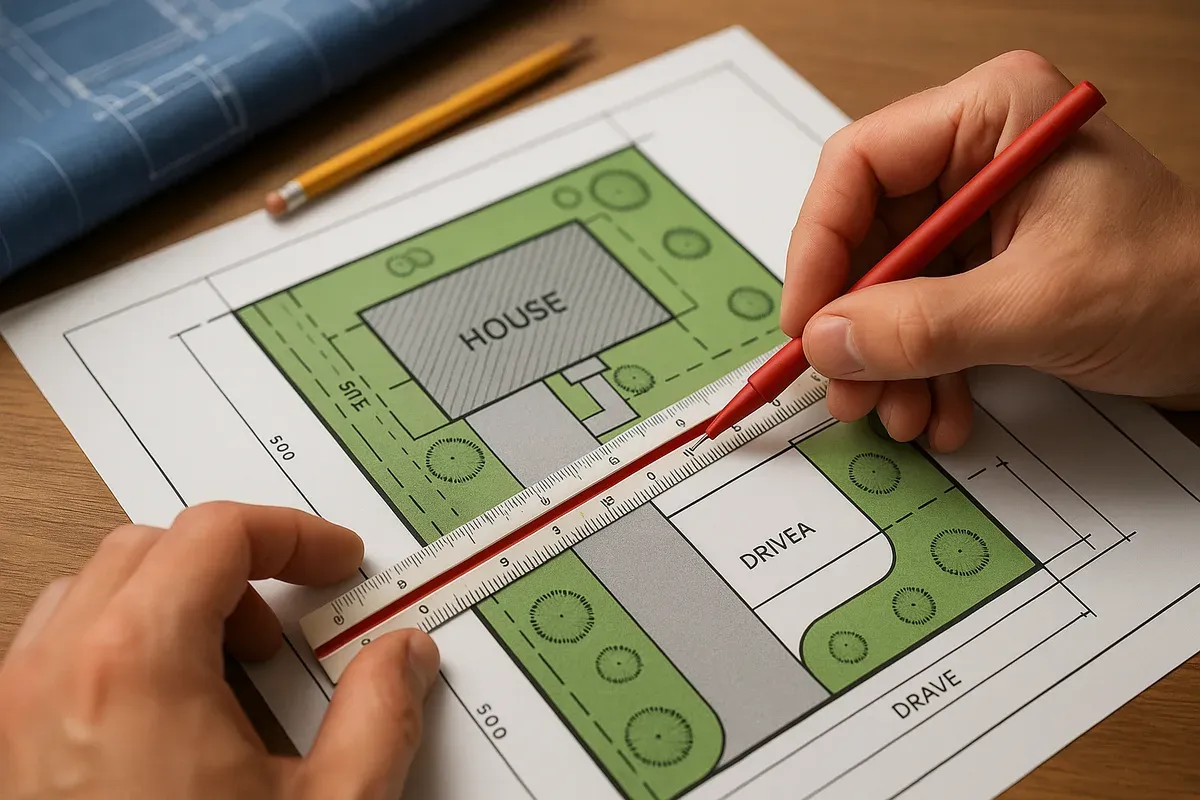
<p>Getting a permit approved starts with one critical document: a site plan. Whether you're adding a backyard deck, building an <a href="/adu-feasibility-software">accessory dwelling unit</a>, converting a garage, or installing a fence, your local building department will almost certainly require a site plan before they stamp anything approved.</p>
<p>The question most <a href="/homeowners">homeowners</a> and small <a href="/contractors">contractors</a> face is a practical one: do you draw the site plan yourself, or do you pay someone else to do it? Both paths are legitimate, but they come with very different costs, timelines, and risk profiles. The right answer depends on your project type, your local jurisdiction's requirements, your budget, and honestly, how comfortable you are working with measurements and digital tools.</p>
<p>This guide walks through both options in detail so you can make a confident, informed decision before you spend a dollar or draw a single line.</p>
<h2><a href="/what-is-a-site-plan">What Is a Site Plan</a> and Why Does It Matter?</h2>
<p>A site plan is a scaled, bird's-eye drawing of a property that shows the location of existing and proposed structures, property boundaries, setbacks, driveways, easements, utilities, and other relevant features. It gives the permit reviewer a clear picture of how your project fits within your lot and whether it complies with local zoning codes.</p>
<p>For most residential permits, a site plan needs to show:</p>
<ul>
<li><strong>Property boundaries</strong> with accurate dimensions</li>
<li>The location and footprint of all existing structures</li>
<li>The location and footprint of the proposed addition or new structure</li>
<li>Setback distances from property lines, streets, and neighboring structures</li>
<li>Driveways, walkways, and access points</li>
<li>North arrow and scale indicator</li>
<li>Any easements, flood zones, or utility lines that affect the project</li>
</ul>
<p>The <a href="https://www.iccsafe.org" rel="nofollow noopener" target="_blank">International Code Council (ICC)</a> publishes the model building codes that most U.S. jurisdictions adopt, and site plan requirements are woven throughout those standards. Your local municipality may have additional requirements on top of that baseline, so it's always worth checking with your building department before you start drawing.</p>
<h2>The Case for Doing It Yourself</h2>
<p>The DIY route has become dramatically more accessible over the past several years. Browser-based tools like <a href="/">Site Plan Creator</a> have removed the steep learning curve that used to make self-drawn site plans impractical for most homeowners. You no longer need to know AutoCAD or hire a CAD technician to produce a clean, scaled, permit-ready drawing.</p>
<h3>When a DIY Site Plan Makes Sense</h3>
<p>A DIY site plan is often the right call when:</p>
<ol>
<li><p><strong>Your project is straightforward.</strong> A detached shed, a backyard fence, a small deck, or a <a href="/pool-site-plans">swimming pool</a> installation typically involves a simple site plan with few variables. The geometry is manageable, and the permit requirements are usually well-documented.</p>
</li>
<li><p><strong>Your jurisdiction accepts non-engineer-stamped site plans.</strong> Many local building departments, especially for smaller residential projects, do not require a licensed engineer or architect to sign off on the site plan itself. They just need an accurate, scaled drawing. Check with your local permit office to confirm.</p>
</li>
<li><p><strong>You have accurate property measurements.</strong> If you have a recent survey, a recorded plat, or reliable as-built measurements, you have the raw data you need to produce an accurate site plan. Without accurate measurements, no tool or drafter can save you.</p>
</li>
<li><p><strong>Budget is a real constraint.</strong> Professional drafting services for a site plan can run anywhere from $300 to $1,500 or more depending on complexity and location. For a small project, that cost can represent a significant percentage of the total budget.</p>
</li>
<li><p><strong>You need it quickly.</strong> When you use an online tool, you control the timeline. There's no waiting for a drafter's schedule to open up or for revisions to come back.</p>
</li>
</ol>
<h3>What a Good DIY Tool Should Offer</h3>
<p>Not all online site plan tools are created equal. When evaluating whether to use a browser-based application for your DIY site plan, look for:</p>
<ul>
<li>Accurate scale drawing capabilities (not just rough sketches)</li>
<li>Standard symbols for structures, driveways, trees, and utilities</li>
<li>The ability to input real dimensions and have the drawing reflect them precisely</li>
<li>Export options that produce high-resolution, print-ready PDFs</li>
<li>A clean, legible output that looks professional to a permit reviewer</li>
</ul>
<p>Site Plan Creator is built specifically for this use case. It's a browser-based CAD-style application that lets homeowners, contractors, and property managers produce permit-ready site plans without any drafting background. The interface is intuitive enough for a first-time user but precise enough to satisfy most building departments.</p>
<h3>The Real Costs of Going DIY</h3>
<p>DIY doesn't mean free. Here's a realistic breakdown of what you might spend:</p>
<ul>
<li><strong>Software subscription or one-time fee:</strong> Typically $20 to $100 depending on the platform</li>
<li><strong>Your time:</strong> A simple site plan might take 2 to 4 hours for a first-timer. A more complex one could take a full day.</li>
<li><strong>Potential revision time:</strong> If the building department requests changes, you'll need to go back in and update the drawing yourself</li>
<li><strong>Property survey (if you don't have one):</strong> A boundary survey can cost $400 to $1,200, though you may already have a recorded plat from when you purchased the property</li>
</ul>
<p>Total realistic DIY cost for a simple project: $50 to $300, plus your time.</p>
<h2>The Case for Hiring a Professional Drafter</h2>
<p>Hiring a drafter or a professional site plan service is not just for complex commercial projects. There are plenty of residential situations where bringing in a professional is the smarter move, even if it costs more upfront.</p>
<h3>When Hiring a Drafter Makes Sense</h3>
<ol>
<li><p><strong>Your project is complex or large-scale.</strong> New home construction, major additions, ADUs with multiple structures, or projects in historic districts often require detailed site plans that go beyond what most homeowners can reasonably produce on their own.</p>
</li>
<li><p><strong>Your jurisdiction requires a licensed professional's stamp.</strong> Some municipalities require that site plans be prepared or reviewed by a licensed engineer, architect, or land surveyor. In those cases, the DIY route isn't an option, regardless of how good your drawing looks.</p>
</li>
<li><p><strong>You're in a flood zone or have unusual site conditions.</strong> Projects near FEMA-designated flood zones (you can check your property at <a href="https://msc.fema.gov/portal/home" rel="nofollow noopener" target="_blank">FEMA's Flood Map Service Center</a>) often require detailed elevation data and specialized knowledge. A professional who understands those requirements can save you significant headaches.</p>
</li>
<li><p><strong>You've already had a permit rejected.</strong> If you submitted a site plan and it came back with corrections or was rejected outright, a professional drafter can review what went wrong and produce a corrected drawing that meets the department's standards.</p>
</li>
<li><p><strong>Your time is worth more than the cost.</strong> For many contractors and small business owners, the hours spent learning a new tool and producing a site plan cost more in lost productivity than simply paying a professional to handle it.</p>
</li>
</ol>
<h3>What to Expect When You Hire a Drafter</h3>
<p>Professional drafting services vary widely in scope and price. Here's what the process typically looks like:</p>
<ul>
<li><strong>Initial consultation:</strong> You provide your property information, project description, and any existing surveys or measurements. The drafter may ask clarifying questions about setbacks, utility locations, and local code requirements.</li>
<li><strong>Draft production:</strong> Depending on complexity, a first draft usually comes back within 3 to 10 business days.</li>
<li><strong>Review and revisions:</strong> You review the draft, request any changes, and the drafter incorporates them. Most services include one or two rounds of revisions.</li>
<li><strong>Final delivery:</strong> You receive a finished, print-ready PDF (and sometimes a CAD file) ready for submission to the building department.</li>
</ul>
<p>Typical costs for professional drafting services:</p>
<ul>
<li>Simple residential site plan: $300 to $600</li>
<li>Moderate complexity (ADU, addition, pool with multiple structures): $600 to $1,200</li>
<li>Complex or commercial site plan: $1,200 and up</li>
</ul>
<p>Turnaround time is a real factor. Most professional drafters are not available on-demand, and depending on their workload, you might wait one to three weeks for a finished drawing. If your permit timeline is tight, that delay matters.</p>
<h2>Comparing DIY vs. Professional: A Side-by-Side Look</h2>
<p>Here's a practical comparison across the dimensions that matter most for permit applicants:</p>
<h3>Cost</h3>
<ul>
<li>DIY: $50 to $300 (software plus any survey costs)</li>
<li>Professional: $300 to $1,500+</li>
</ul>
<h3>Timeline</h3>
<ul>
<li>DIY: Same day to a few days, depending on your learning curve</li>
<li>Professional: 3 to 14 business days, depending on drafter availability</li>
</ul>
<h3>Accuracy</h3>
<ul>
<li>DIY: High if you have accurate measurements and use a quality tool; lower if you're estimating dimensions</li>
<li>Professional: High, assuming you provide accurate input data (a drafter can only work with what you give them)</li>
</ul>
<h3>Permit Approval Rate</h3>
<ul>
<li>DIY: Variable; depends heavily on the tool quality and your attention to local requirements</li>
<li>Professional: Generally higher, especially if the drafter has experience with your local jurisdiction</li>
</ul>
<h3>Flexibility for Revisions</h3>
<ul>
<li>DIY: Immediate; you can make changes yourself at any time</li>
<li>Professional: Dependent on the drafter's availability and revision policy</li>
</ul>
<h3>Best For</h3>
<ul>
<li>DIY: Sheds, fences, decks, pools, small additions, straightforward residential projects</li>
<li>Professional: New construction, ADUs, complex additions, flood zone projects, jurisdictions requiring stamped drawings</li>
</ul>
<h2>SitePlanCreator vs MySitePlan: Choosing the Right DIY Tool</h2>
<p>If you've decided the DIY route is right for your project, the next question is which tool to use. Two names that come up frequently in this space are Site Plan Creator and MySitePlan.</p>
<p><strong>MySitePlan</strong> is a service that blends DIY and professional elements. You fill out a form with your property details, and their team produces a site plan for you. It's not truly self-service; you're essentially outsourcing the drawing work, which means you're subject to their turnaround times and revision process. Prices typically start around $69 for a basic plan and go up from there.</p>
<p><strong>Site Plan Creator</strong> takes a different approach. It's a genuine browser-based CAD-style application that puts you in control of the drawing. You input your property dimensions, place structures, set setbacks, add labels, and export a finished PDF, all within the browser, with no software to install. The advantage is real-time control: you can see exactly what your site plan looks like as you build it, make instant changes, and export immediately when you're done.</p>
<p>For homeowners and contractors who want to understand their own site plan, make quick revisions without waiting on a third party, and produce a professional-looking document at a lower cost, Site Plan Creator is the stronger choice. For someone who simply wants to hand off the task entirely and doesn't mind the wait, a managed service like MySitePlan may feel more comfortable.</p>
<p>The key distinction is control versus convenience. Site Plan Creator gives you control. MySitePlan gives you a hands-off experience at a price point that's lower than a full professional drafter but higher than true DIY software.</p>
<h2>Common Mistakes to Avoid in Either Approach</h2>
<p>Whether you go DIY or hire a drafter, these mistakes can derail your permit application:</p>
<h3>Not Verifying Local Requirements First</h3>
<p>Building department requirements vary significantly from one jurisdiction to another. Before you draw a single line or hire anyone, call your local building department or check their website. Ask specifically what a site plan must include for your project type. The <a href="https://www.planning.org" rel="nofollow noopener" target="_blank">American Planning Association</a> offers resources on zoning and land use that can help you understand the broader regulatory landscape, but local requirements always take precedence.</p>
<h3>Using Inaccurate Measurements</h3>
<p>A site plan is only as good as the measurements behind it. If you're estimating your lot dimensions or pacing off distances, you're setting yourself up for a rejection. Use a recorded plat, a recent survey, or careful physical measurements with a tape measure and a helper.</p>
<h3>Ignoring Setback Requirements</h3>
<p>Setbacks are the minimum distances required between a structure and property lines, streets, or other features. They vary by zoning district and structure type. Failing to show setbacks correctly, or proposing a structure that violates them, is one of the most common reasons site plans get rejected.</p>
<h3>Submitting a Drawing That Isn't to Scale</h3>
<p>Permit reviewers need to be able to verify dimensions visually. A site plan that isn't drawn to a consistent scale, or that doesn't include a scale bar and north arrow, will often be rejected outright. Always confirm your drawing is to scale before submitting.</p>
<h3>Not Accounting for Easements</h3>
<p>Easements (utility easements, drainage easements, access easements) can restrict where you're allowed to build. They should appear on your recorded plat and need to be reflected on your site plan. Missing an easement is a common oversight that can cause major problems later.</p>
<h2>How to Decide: A Simple Decision Framework</h2>
<p>If you're still not sure which path is right for you, work through these questions:</p>
<ol>
<li><p>Does your jurisdiction require a licensed professional's stamp on the site plan? If yes, hire a professional. Full stop.</p>
</li>
<li><p>Is your project a simple structure (shed, fence, deck, pool, small addition) on a straightforward lot? If yes, DIY is likely a good fit.</p>
</li>
<li><p>Do you have accurate property measurements or a recent survey? If no, get a survey first, then decide on DIY vs. professional.</p>
</li>
<li><p>Is your property in a FEMA flood zone or a historic district? If yes, lean toward a professional with relevant experience.</p>
</li>
<li><p>Is your permit timeline tight (less than a week)? If yes, DIY gives you more control over the schedule.</p>
</li>
<li><p>Is your total project budget under $5,000? If yes, the cost savings from DIY are proportionally significant and worth considering.</p>
</li>
<li><p>Have you already had a permit rejected? If yes, consider a professional to identify and correct the issues.</p>
</li>
</ol>
<h2>Tips for a Successful DIY Site Plan</h2>
<p>If you've decided to go the DIY route, here's how to set yourself up for success:</p>
<ul>
<li>Start with your recorded plat. This document, which you should have received when you purchased your property, shows your lot boundaries, dimensions, and any recorded easements.</li>
<li>Measure twice. Physically verify your lot dimensions and the location of existing structures before you start drawing.</li>
<li>Research your <a href="/setback-guide">setback requirements</a>. Look up your property's zoning district and find the setback table for your structure type.</li>
<li>Use a quality tool. A browser-based application like Site Plan Creator produces clean, scaled, professional-looking output that building departments recognize as legitimate.</li>
<li>Include everything the department asks for. Review the checklist for your permit type and make sure every required element appears on your drawing.</li>
<li>Export at high resolution. A blurry or pixelated site plan creates a bad first impression and may be rejected.</li>
<li>Keep a copy of your submitted plan. If revisions are requested, you'll want to know exactly what you submitted so you can compare it to the reviewer's comments.</li>
</ul>
<h2>The Bottom Line</h2>
<p>There's no universal right answer to the DIY vs. professional question. The right choice depends on your specific project, your local jurisdiction, your budget, and your comfort level with the process.</p>
<p>For the majority of straightforward residential permit projects in 2026, a well-executed DIY site plan using a quality browser-based tool is entirely sufficient and significantly more affordable than hiring a drafter. The tools available today are genuinely good, and building departments across the country routinely accept site plans produced by homeowners and contractors using software like Site Plan Creator.</p>
<p>For complex projects, flood zone situations, jurisdictions with professional stamp requirements, or cases where a permit has already been rejected, investing in a professional drafter is the smarter call. The upfront cost is real, but so is the value of getting it right the first time.</p>
<p>Whatever path you choose, the goal is the same: a clear, accurate, permit-ready site plan that gives your building department everything they need to say yes.</p>
<p>If you're ready to try the DIY route, Site Plan Creator makes it straightforward. Start with your property measurements, open the browser-based tool, and you could have a finished, permit-ready site plan today. No drafting experience required, no software to install, and no waiting on someone else's schedule.</p>